

Logic Pro vs Ableton Live, Which DAW Should You Buy?
Ask ten producers which DAW is “better,” and you’ll get ten different answers, usually delivered with more confidence than the question deserves. The truth is that Logic Pro vs Ableton Live are built around different ideas of how music gets made, and the right choice depends far more on your workflow and goals than on any objective quality gap between them.
This comparison skips the tribalism and focuses on what actually changes your day-to-day experience: how each one handles arrangement, live performance, included instruments, pricing, and the kind of music each is genuinely built for.

The Short Version
| If you’re.. | Lean toward |
|---|---|
| Writing songs, scoring, or working with live-recorded instruments | Logic Pro |
| Making electronic music, beats, or performing live with a laptop | Ableton Live |
| On Windows | Ableton Live (Logic Pro is Mac/iPad-only) |
| Looking for the lowest total cost for a full-featured DAW | Logic Pro |
| Remixing, sampling, or building loop-based arrangements non-linearly | Ableton Live |
Platform and Pricing
This is where the comparison gets genuinely lopsided in one specific way: Logic Pro only runs on Mac and iPad. If you’re on Windows, this entire comparison is moot — Ableton Live is your option. Ableton Live runs natively on both Mac and Windows.
Pricing works differently between the two as well. Logic Pro is a single product at a fixed one-time price, while Ableton Live is split across three editions with meaningfully different feature sets.
| Product | Price | Model |
|---|---|---|
| Logic Pro (Mac) | $199.99 | One-time purchase, free updates |
| Apple Creator Studio (includes Logic Pro for Mac + iPad) | $12.99/mo or $129/yr | Subscription bundle (also includes Final Cut Pro, Motion, and other Apple creative apps) |
| Ableton Live 12 Intro | $99 | One-time purchase, limited tracks/instruments |
| Ableton Live 12 Standard | ~$439 | One-time purchase, unlimited tracks, most instruments |
| Ableton Live 12 Suite | $749 | One-time purchase, full instrument library + Max for Live |
Prices fluctuate with sales (Ableton frequently discounts 20-25% around Black Friday) and education pricing. Check each company’s site for current offers before buying.
What this actually means for your wallet
If you’re comparing like-for-like feature depth, Logic Pro at $199.99 lines up closest to Ableton Live Standard at roughly double the price, and Logic includes a genuinely enormous bundled sound library (70GB+) at that lower price point. Ableton’s Suite edition costs more than triple Logic Pro but includes Max for Live, a visual programming environment with no real Logic equivalent, plus a much deeper synth and effects roster.
Workflow Philosophy Linear vs Non-Linear
This is the single biggest practical difference between the two, and it matters more than any feature checklist.

Logic Pro
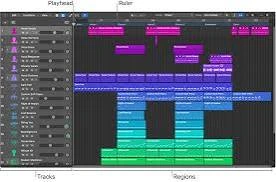
is built around a traditional linear timeline; tracks run left to right, and you arrange your song by placing regions along that timeline, much like a tape machine reimagined in software. It’s an intuitive model if you’re used to writing songs in a fairly conventional structure: verse, chorus, bridge.

Ableton Live
Splits its interface into two views: the familiar Arrangement View (similar to Logic’s timeline) and the Session View, a grid of audio and MIDI clips you can trigger in any order, in real time, without a fixed timeline at all. This is Ableton’s defining feature — you can jam, loop, and rearrange ideas on the fly, then commit a version to the Arrangement View once you land on something worth keeping.
Why this distinction matters more than it sounds
If you write music by starting at bar one and moving forward, Logic’s linear approach will feel completely natural, and you likely won’t miss Session View at all. If you build tracks by looping a drum pattern, layering elements on top, and discovering the arrangement as you go — which is extremely common in electronic music production — Ableton’s non-linear approach removes a lot of friction that Logic simply wasn’t designed to solve.
Included Instruments and Sound Content
| Logic Pro | Ableton Live (Suite) | |
|---|---|---|
| Bundled sound library | 70GB+, includes Drummer, Session Players, orchestral and band instruments | Genre-focused Packs, vary significantly by edition |
| Flagship synth(s) | Alchemy (granular/spectral synthesis) | Wavetable, Operator, Meld (Live 12) |
| Sampling tools | Quick Sampler, Sampler | Simpler, Sampler |
| AI-assisted tools | Session Players, Stem Splitter, Chord ID, Mastering Assistant | AI-driven sound search, Stem Separation (Live 12.3+) |
| Extensibility | Audio Units (AU) third-party plugins | VST/AU third-party plugins, plus Max for Live (Suite only) |
Logic’s included instrument set leans toward realism and traditional arrangement — full drum kits, orchestral sections, guitar and bass amp simulations, and its Session Players feature, which generates full backing performances (drums, bass, keys) that adapt to your chord progression. Ableton’s strength is in synthesis and sound design flexibility, particularly through Max for Live, which lets you build or download custom devices that go well beyond what either DAW ships with natively.
Live Performance
This category isn’t close. Ableton Live’s Session View was designed from the ground up for performing music live, triggering clips, looping sections, and improvising arrangements in real time in front of an audience, which is where the software’s name comes from. It pairs naturally with Ableton’s own Push hardware controller and a huge ecosystem of MIDI controllers built specifically around Session View’s grid layout.
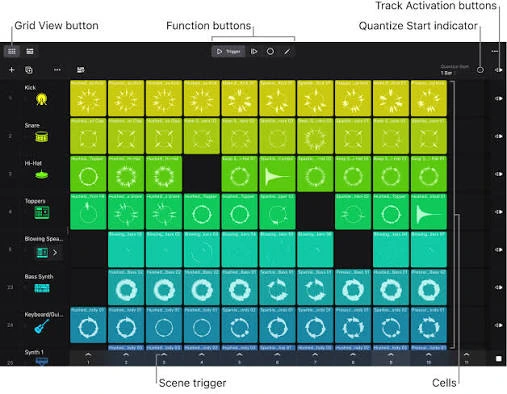
Logic Pro has a comparable feature called Live Loops, introduced to bring some of that same clip-triggering flexibility into Logic. It’s genuinely useful for sketching ideas and casual live use, but it’s a feature bolted onto a fundamentally linear DAW rather than the DAW’s core design principle; most performing electronic musicians still choose Ableton for this specific use case.
MIDI Editing and Sound Design Depth
Logic Pro’s MIDI environment is deep and mature — the Piano Roll, Step Sequencer, and dedicated Score Editor (useful for anyone writing for real musicians who read notation) are all best-in-class. Its automation and Flex Time/Pitch tools for manipulating audio timing and pitch are also very strong.
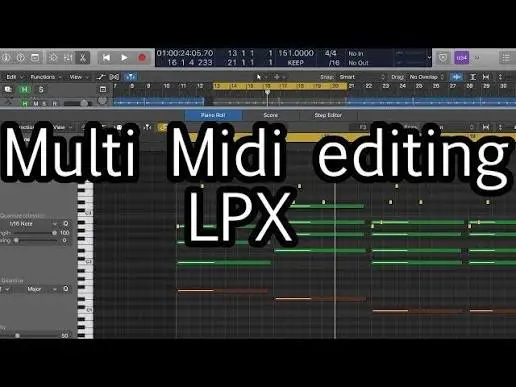
Ableton Live 12 introduced a significant overhaul to its MIDI tools, adding generative and transformative MIDI effects that let you manipulate note data (arpeggiation, randomization, scale-locking, and more) in ways that go beyond simple piano-roll editing. This aligns with Ableton’s broader identity as a tool for experimentation and sound design rather than pure traditional composition.

Visual Comparison: Subjective Strengths by Category
The chart below reflects a consensus among producers who use both DAWs regularly — not a scientific measurement, but a useful shorthand for where each program tends to shine.
Logic Pro Ableton Live
Live performance
Traditional song arrangement
Sound design/synthesis
Recording live instruments/vocals
Scoring/notation work
Beginner-friendliness
Bars represent relative strength within each category, not an overall score — a DAW can be “better” at one thing and behind on another without being worse overall.
Learning Curve
Both DAWs have a real learning curve, but they front-load the difficulty differently. Logic Pro’s interface follows a fairly conventional recording-studio metaphor, so if you’ve used any other traditional DAW (Pro Tools, Cubase, GarageBand), a lot of the concepts transfer immediately. Its depth shows up later, in the sheer number of features layered underneath a fairly approachable surface.

Ableton Live’s Session View is a genuinely different mental model from a traditional timeline, so there’s an initial adjustment period even for experienced producers coming from other DAWs. Once that clicks, though, many users find Ableton’s interface faster for actually building ideas, since there’s less friction between having a musical idea and hearing it looped back at you.

Who Should Choose Logic Pro
- You’re on a Mac and want the lowest-cost, most feature-complete option available
- You write songs with a traditional verse/chorus structure, or work with live-recorded instruments and vocals
- You need notation/score writing for other musicians
- You want Dolby Atmos mixing and podcast/post-production tools built in
- You value a one-time purchase with no ongoing subscription
Who Should Choose Ableton Live
- You’re on Windows, or want cross-platform flexibility
- You make electronic music, beats, or sample-based production built from loops rather than a fixed timeline
- You perform live and want to trigger and improvise with clips in real time
- You want deep sound-design tools and access to Max for Live’s programmable device ecosystem
- You don’t mind paying more upfront for Suite in exchange for a broader instrument and effects library

FAQS
Can Logic Pro do Session View-style clip launching at all?
Yes, through its Live Loops feature, which lets you trigger and loop clips similarly to Ableton’s Session View. It’s a solid tool for sketching ideas but isn’t as deeply integrated into Logic’s overall workflow as Session View is in Ableton, where it’s the software’s core design rather than an add-on.
Is Ableton Live harder to learn than Logic Pro?
Not inherently harder, just different. Logic’s linear timeline maps closely to traditional recording software, so prior DAW experience transfers quickly. Ableton’s dual-view workflow takes a bit longer to click for newcomers, but many people find it faster once it does.
Can I switch between them without losing my work?
Not directly. Logic Pro and Ableton Live use incompatible project file formats, and there’s no native import/export between the two. You can export stems or audio bounces from one and bring those into the other, but MIDI data, plugin settings, and automation won’t transfer as a full project.
Do professional studios prefer one over the other?
It varies heavily by genre and role. Logic Pro is common among songwriters, composers, and post-production/podcast engineers, particularly in Mac-based studios. Ableton Live dominates in electronic music production and live performance contexts. Large studios frequently have both available depending on the engineer and project.
Which one has better third-party plugin support?
Ableton Live supports both VST and Audio Units on Mac (and VST on Windows), giving it the wider net since VST is the most common third-party plugin format. Logic Pro only supports Audio Units (AU), which covers the vast majority of professional plugins on Mac but excludes Windows-only VST-exclusive releases.
Final Verdict
Neither DAW is objectively superior; they’re solving different problems. Logic Pro is the stronger choice if you want a complete, traditional recording studio in software form at a genuinely fair price, especially if live instruments, vocals, or notation are part of your workflow. Ableton Live is the stronger choice if your music starts from loops, beats, or live performance, or if you’re not on a Mac at all.
If you’re still unsure, both companies offer trial periods — Ableton Live offers a 90-day free trial of Suite, and Logic Pro can be tested at an Apple Store or via a friend’s Mac. Spend a weekend actually building something in each before spending money; the “right” DAW is almost always the one that gets out of your way while you’re making music, and that’s something a feature comparison can only point you toward, not settle for you.
 Reliable Knowledge, Fresh Perspectives