
Logic Pro vs FL Studio (2026): Which DAW Is Better for Music Production?
Choosing your first digital audio workstation (DAW) is one of the biggest decisions you’ll make as a music producer. Two names almost always appear at the top of the list: Logic Pro vs FL Studio. Both are powerful, trusted by professionals, and capable of producing commercial-quality music. However, they offer very different workflows and are designed with different types of users in mind.
If you’ve been searching for answers like “Should I use Logic Pro or FL Studio?” or “Which DAW is better for beginners?”, this guide is for you.
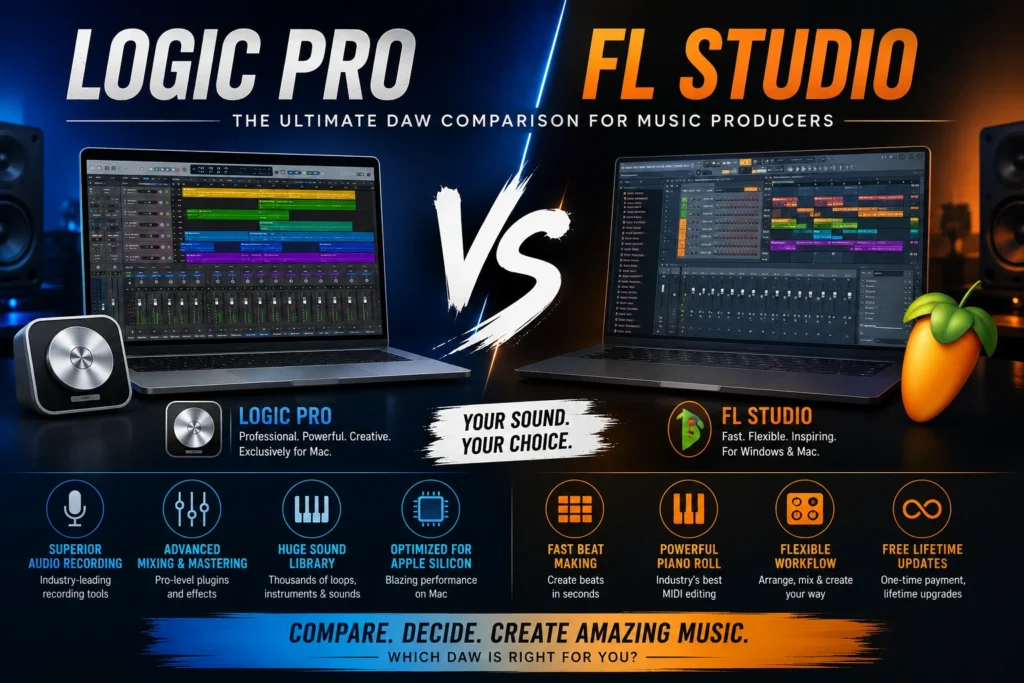
Instead of declaring one program the winner, we’ll compare them fairly so you can decide which one fits your style of music production.
Quick Overview
Before diving into the details, here’s a simple overview of both DAWs.
Logic Pro

Logic Pro is developed by Apple and is available exclusively for macOS. It’s an all-in-one music production suite that includes professional recording tools, virtual instruments, mixing plugins, mastering effects, and a huge library of sounds.
It’s widely used by:
- Songwriters
- Recording engineers
- Film composers
- Podcast creators
- Professional producers
- Musicians working with live instruments
FL Studio

FL Studio, developed by Image-Line, is available for both Windows and macOS. It became famous for its fast beat-making workflow and intuitive pattern-based sequencing.
Today, it’s used for much more than electronic music, but it remains especially popular among:
- Hip-Hop producers
- EDM artists
- Trap producers
- Beat makers
- Electronic musicians
- Beginners learning music production
Logic Pro vs FL Studio: Feature Comparison
| Feature | Logic Pro | FL Studio |
|---|---|---|
| Operating System | macOS only | Windows & macOS |
| Recording | Excellent | Very Good |
| Beat Making | Excellent | Excellent |
| MIDI Editing | Excellent | Excellent |
| Built-in Instruments | Huge Collection | Large Collection |
| Audio Editing | Excellent | Very Good |
| Mixing Tools | Professional | Professional |
| Beginner Friendly | Yes | Yes |
| Free Lifetime Updates | No | Yes |
| Best For | Recording & Full Production | Beat Making & Electronic Music |
Both programs are capable of producing professional music, but the way they approach music production is quite different.
User Interface
One of the first things you’ll notice is how different these DAWs look.
Logic Pro

Logic Pro has a clean, organized interface. Most tools are easy to find, and the layout feels similar to a traditional recording studio.
Tracks, mixer channels, instruments, and editing windows are arranged in a way that helps beginners understand the recording process.
If you plan to record vocals, guitars, or live instruments, Logic Pro feels very natural.
FL Studio
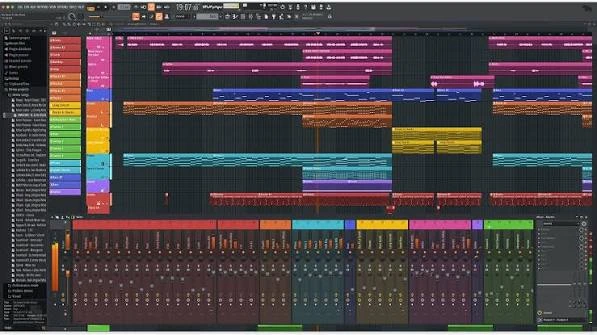
FL Studio takes a different approach.
Instead of focusing on a traditional recording workflow, it centers around patterns and the Channel Rack.
This makes creating drum loops and beats incredibly fast.
At first, the interface may look busy, but many producers love its flexibility once they become familiar with it.
Learning Curve
Many beginners ask which software is easier to learn.
The answer depends on what you want to create.
Choose Logic Pro if you want to:
- Record vocals
- Record guitars
- Produce complete songs
- Learn professional recording techniques
- Mix and master audio
Its workflow follows the same principles used in many professional recording studios.
Choose FL Studio if you want to:
- Make beats quickly
- Produce electronic music
- Create loops
- Experiment with patterns
- Build songs from MIDI
Beat makers often find FL Studio easier during the early stages of learning.
Recording Performance
If recording live audio is your main focus, Logic Pro has an advantage.
It was designed with recording engineers and musicians in mind.
Recording vocals, guitars, drums, and podcasts feels smooth and straightforward.
Logic Pro also includes powerful editing features like Flex Time and Flex Pitch, making it easy to fix timing or pitch issues without leaving the project.
FL Studio supports audio recording as well, and it has improved significantly over the years. However, many users still feel that its recording workflow isn’t quite as streamlined as Logic Pro’s.
Beat Making
This is where FL Studio built its reputation.
Its Channel Rack, Piano Roll, and step sequencer allow producers to create drum patterns quickly.
Hip-Hop, Trap, and EDM producers often appreciate how fast ideas can come together in FL Studio.
That doesn’t mean Logic Pro can’t make beats.
Logic Pro includes excellent drum machines, samplers, Live Loops, and MIDI editing tools, making it more than capable of producing modern electronic music.
The difference is that FL Studio was originally designed around beat production, while Logic Pro offers a broader recording and production environment.
Built-in Sounds and Plugins
One reason Logic Pro offers excellent value is its impressive collection of included content.
You get:
- Professional software instruments
- Studio-quality effects
- Thousands of Apple Loops
- Drummer
- Sampler
- Vintage synths
- Orchestral instruments
- Guitar amps and pedals
Everything is ready to use immediately after installation.
FL Studio also includes a strong selection of instruments and effects, particularly for electronic music production.
Its synthesizers are highly regarded, especially among EDM producers.
However, depending on which edition you purchase, the included plugins may vary.
Performance and Speed
A DAW should feel smooth and reliable, especially when you’re working on large projects with dozens of tracks and plugins. Both Logic Pro and FL Studio perform well, but they have different strengths.
Logic Pro Performance
Logic Pro is designed specifically for macOS, which means Apple can optimize it for its own hardware. If you’re using a Mac with an Apple Silicon chip (M1, M2, M3, or newer), you’ll notice fast loading times, smooth playback, and excellent stability.
Even large projects with many audio tracks and virtual instruments run efficiently on modern Macs.
Best for:
- Recording studios
- Large music projects
- Film scoring
- Live instrument sessions
- Professional mixing
FL Studio Performance
FL Studio is known for being lightweight and responsive. It runs on both Windows and macOS, giving users more flexibility when choosing a computer.
The software handles MIDI-heavy projects extremely well and is popular among producers who create beats using virtual instruments and drum patterns.
Recent versions have also improved audio recording performance and overall stability.
Best for:
- Beat production
- Electronic music
- MIDI-based projects
- Home studios
- Producers using Windows PCs
Audio Recording
Recording is one area where many users feel Logic Pro has an advantage.
The recording workflow is simple, clean, and designed for musicians who work with microphones and instruments.
You can easily record:
- Vocals
- Acoustic guitar
- Electric guitar
- Bass
- Drums
- Piano
- Podcasts
- Voiceovers
Features like Take Folders, Flex Time, and Flex Pitch make editing recordings quick and efficient.
FL Studio also supports multitrack recording, but many producers still prefer Logic Pro for projects that involve a lot of live audio.
MIDI Editing
Both DAWs include excellent MIDI editing tools, but they approach the task differently.
Logic Pro
Logic Pro offers a clean Piano Roll, MIDI editing tools, quantization, automation, and smart editing features. Everything is well organized and easy to understand.
FL Studio
FL Studio’s Piano Roll is considered one of the best in the industry. It gives producers incredible control when creating melodies, drum patterns, and complex MIDI arrangements.
If your workflow revolves around programming beats and electronic music, FL Studio has a slight advantage in this area.
Built-in Instruments and Effects
One of the biggest reasons people choose Logic Pro is the amount of content included with the software.
Out of the box, you’ll find:
- Professional drum kits
- Realistic pianos
- Vintage keyboards
- Orchestral instruments
- Synthesizers
- Bass sounds
- Guitar amps
- Studio-quality effects
- Thousands of Apple Loops
You can start producing music immediately without buying extra plugins.
FL Studio also includes an excellent collection of synthesizers, samplers, and creative effects. Producers who focus on EDM, house, trap, and hip-hop often enjoy its sound design tools.
Third-Party Plugin Support
Both programs work well with third-party plugins.
Logic Pro supports Audio Units (AU) plugins, which are the standard plugin format for macOS.
FL Studio supports VST, VST3, and other common plugin formats, making it compatible with a wide range of plugins on both Windows and Mac.
If you already own a large VST plugin collection and use multiple operating systems, FL Studio offers more flexibility.
Pricing
Pricing is another important difference.
Logic Pro
Logic Pro is purchased once through the Mac App Store. The purchase includes a large collection of instruments, loops, and effects, making it excellent value for many users.
FL Studio
FL Studio is available in several editions, allowing users to choose a version based on their needs and budget.
One of its biggest advantages is that Image-Line provides free lifetime updates, meaning you receive future software updates without buying a new license.
Pros and Cons
Logic Pro
Pros
- Clean and beginner-friendly interface
- Excellent recording workflow
- Huge library of instruments and sounds
- Optimized for Apple Silicon
- Professional mixing and mastering tools
- Great value for Mac users
Cons
- Available only on macOS
- No free lifetime updates
- Not suitable for Windows users
FL Studio
Pros
- Available for Windows and macOS
- Excellent Piano Roll
- Fast beat-making workflow
- Flexible pattern-based sequencing
- Free lifetime updates
- Great for electronic music
Cons
- Interface can feel overwhelming at first
- Audio recording workflow is less intuitive than Logic Pro
- Some advanced features depend on the edition you purchase
Which DAW Should You Choose?
Your decision should depend on the type of music you create.
Choose Logic Pro if you:
- Use a Mac
- Record vocals regularly
- Play live instruments
- Produce podcasts
- Want an all-in-one production studio
- Prefer a traditional recording workflow
Choose FL Studio if you:
- Make hip-hop or EDM
- Spend most of your time programming MIDI
- Use Windows
- Prefer pattern-based sequencing
- Want free lifetime software updates
Neither choice is wrong. Both programs are capable of producing professional-quality music used on streaming platforms, in films, and on the radio.
Logic Pro vs FL Studio for Different Users
Now that we’ve compared the main features, the next question is simple:
Which DAW is right for you?
The answer depends on your experience, your computer, and the type of music you want to create.
Let’s look at a few common situations.
Best for Beginners
If you’re completely new to music production, both Logic Pro and FL Studio are excellent choices. They include tutorials, built-in instruments, and enough features to help you learn without buying extra software.
Choose Logic Pro if you:
- Prefer a clean and organized workspace.
- Want to learn recording and mixing.
- Plan to record vocals or instruments.
- Already own a Mac.
Choose FL Studio if you:
- Want to start making beats immediately.
- Enjoy experimenting with electronic music.
- Like a fast, pattern-based workflow.
- Use a Windows PC.
Both DAWs have active communities, so you’ll find plenty of tutorials and learning resources online.
Best for Music Producers
Professional producers use both Logic Pro and FL Studio to create chart-topping music.
Logic Pro is often chosen for:
- Pop music
- Rock
- Acoustic recordings
- Film scores
- Podcasts
- Singer-songwriter projects
FL Studio is especially popular for:
- Hip-Hop
- Trap
- EDM
- House
- Techno
- Lo-fi beats
Remember, the software doesn’t determine the quality of your music—your creativity and skills do.
Which DAW Has the Better Workflow?
Workflow is one of the biggest differences between these programs.
Logic Pro follows a traditional studio layout. Recording, editing, and mixing all happen in a structured timeline, making it feel familiar if you’ve ever worked in a recording studio.
FL Studio takes a more creative approach. Its pattern-based workflow encourages experimentation, allowing producers to build ideas quickly before arranging them into a full song.
Neither workflow is better than the other—they simply suit different styles of production.
FAQS
Is Logic Pro easier than FL Studio?
Many beginners find Logic Pro easier because the interface is clean and well organized. However, if your main goal is creating beats, FL Studio’s workflow may feel more natural after a little practice.
Can FL Studio do everything Logic Pro can?
FL Studio is capable of recording, editing, mixing, and producing professional music. However, some users prefer Logic Pro for projects that involve extensive live recording or film scoring.
Is Logic Pro only for Mac?
Yes. Logic Pro is developed by Apple and is available exclusively for macOS.
Can I use FL Studio on a Mac?
Yes. FL Studio supports both Windows and macOS, making it a good option for users who switch between operating systems.
Which DAW is better for recording vocals?
Logic Pro generally offers a smoother recording workflow, especially for singers, podcasters, and musicians recording live instruments.
Which DAW is better for beat making?
FL Studio has long been known for its fast beat-making tools, intuitive Piano Roll, and pattern-based sequencing. Many hip-hop and electronic music producers prefer it for this reason.
Which DAW has better built-in plugins?
Both include excellent plugins. Logic Pro offers a large collection of instruments, effects, and loops in a single package, while FL Studio includes powerful synthesizers and creative production tools, with some features depending on the edition you choose.
Can I switch from FL Studio to Logic Pro?
Yes. Many producers eventually learn more than one DAW. Understanding different workflows can make you a more flexible and efficient music creator.
Final Verdict
Both Logic Pro and FL Studio are outstanding digital audio workstations, and both are capable of producing professional-quality music. The best choice depends on your goals rather than which software is more popular.
If you primarily record vocals, guitars, podcasts, or full-band sessions on a Mac, Logic Pro offers a polished workflow, a huge collection of built-in sounds, and professional recording tools that are ready to use from day one.
If your focus is creating beats, electronic music, or MIDI-based productions—and especially if you use Windows—FL Studio provides a fast, creative environment that many producers love.
There isn’t a single winner because every producer works differently. The most important thing is to choose the DAW that helps you stay creative and finish your projects.
Whichever software you choose, spending time learning its tools and practicing regularly will have a much bigger impact on your music than switching between DAWs.
Comparison Summary
| Category | Logic Pro | FL Studio |
|---|---|---|
| Best Operating System | macOS | Windows & macOS |
| Recording | ⭐⭐⭐⭐⭐ | ⭐⭐⭐⭐☆ |
| Beat Making | ⭐⭐⭐⭐☆ | ⭐⭐⭐⭐⭐ |
| MIDI Editing | ⭐⭐⭐⭐⭐ | ⭐⭐⭐⭐⭐ |
| Built-in Instruments | ⭐⭐⭐⭐⭐ | ⭐⭐⭐⭐☆ |
| Mixing & Mastering | ⭐⭐⭐⭐⭐ | ⭐⭐⭐⭐☆ |
| Ease of Learning | ⭐⭐⭐⭐⭐ | ⭐⭐⭐⭐☆ |
| Electronic Music | ⭐⭐⭐⭐☆ | ⭐⭐⭐⭐⭐ |
| Overall for Mac Users | ⭐⭐⭐⭐⭐ | ⭐⭐⭐⭐☆ |
 Reliable Knowledge, Fresh Perspectives