

Logic Pro Stem Splitter: The Complete Guide to Separating Vocals and Instruments
Separating vocals from a song once required expensive software, complicated editing techniques, or access to the original recording session. Today, that process is much easier thanks to Logic Pro Stem Splitter, one of Apple’s most impressive AI-powered production tools.
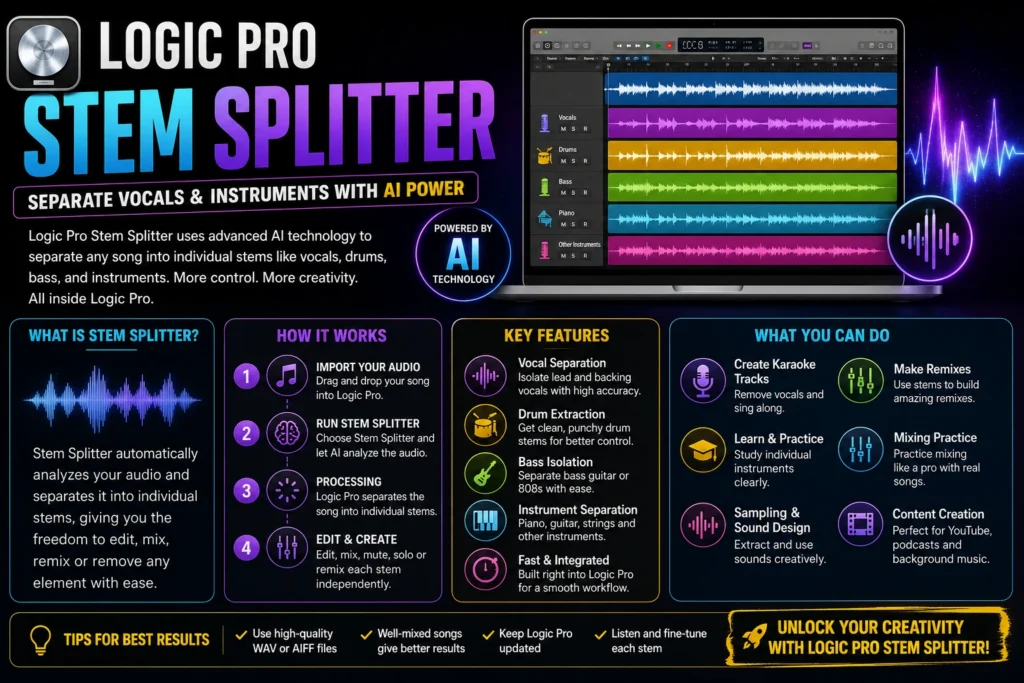
Whether you want to create a remix, remove vocals for karaoke, study a bass line, or practice mixing a professional track, Stem Splitter allows you to isolate different parts of a song in just a few clicks. Instead of working with one stereo audio file, Logic Pro automatically creates separate tracks for vocals, drums, bass, and other instruments, giving you much greater creative control.
The best part is that everything happens inside Logic Pro. You don’t need online services, third-party applications, or complicated workflows. If you’re already using Logic Pro, Stem Splitter can become one of the most useful tools in your music production process.
In this guide, you’ll learn how Stem Splitter works, its main features, practical uses, and the best ways to achieve clean and professional results.
What Is Logic Pro Stem Splitter?
Logic Pro Stem Splitter is an AI-based feature that analyzes a complete audio recording and separates it into multiple editable stems. A stem is an individual audio track that contains a specific element of the song instead of the complete mix.
For example, instead of having one audio file containing everything, Logic Pro can separate it into individual tracks such as vocals, drums, bass, and other instruments. Each stem appears on its own track, allowing you to edit or process it independently.
This feature has become extremely popular among producers, DJs, music teachers, and content creators because it removes the need to manually isolate frequencies or search for original multitrack recordings.
What Are Audio Stems?
Before using Stem Splitter, it’s important to understand what stems actually are.
A stem is a grouped audio track exported from a complete mix. Rather than editing the entire song, you can work with each musical element separately.
| Original Audio | Stem Splitter Output |
|---|---|
| Full Song | Lead Vocals |
| Full Song | Drums |
| Full Song | Bass |
| Full Song | Other Instruments |
Having access to these stems gives you much more flexibility during editing, mixing, and production.
Why Did Apple Introduce Stem Splitter?
Modern music production relies heavily on flexibility. Producers often need to isolate vocals for remixes, remove instruments for practice sessions, or create instrumental versions without access to the original project.
Stem Splitter solves these problems by using machine learning to recognize different sound sources automatically.
Instead of spending hours manually editing frequencies, Logic Pro performs the separation within minutes, making advanced audio editing accessible to beginners and professionals alike.
Key Features of Logic Pro Stem Splitter
Stem Splitter is much more than a simple vocal remover. It offers several features that improve both creativity and workflow.
AI-Powered Audio Separation
Logic Pro uses intelligent audio analysis to identify different elements within a song. This produces cleaner separations than traditional EQ-based methods.
Separate Multiple Instruments
Depending on the recording, Stem Splitter can isolate:
- Lead vocals
- Backing vocals
- Drums
- Bass
- Piano
- Guitar
- Other instruments
The quality of separation depends on the complexity and quality of the original recording.
Integrated Workflow
Because Stem Splitter is built directly into Logic Pro, you don’t need to export files to external websites or install additional software.
Everything remains inside your music production session.
Fast Processing
On modern Apple silicon Macs, most songs can be processed within a few minutes, allowing you to continue editing without significant delays.
Why Musicians Use Stem Splitter
Stem Splitter is useful for much more than removing vocals. It has become a valuable production tool for many different types of users.
Remix Production
Many producers use isolated vocal stems to create official-style remixes or mashups without needing access to the original recording session.
Karaoke Tracks
Removing vocals from songs allows singers to practice with instrumental versions of their favorite tracks.
Music Education
Teachers and students can isolate drums, bass, or piano parts to better understand song arrangements and improve their performance.
Mixing Practice
Beginners can practice mixing individual stems from commercial recordings, helping them develop better EQ, compression, and balancing skills.
Sampling
Producers often isolate instruments or vocal phrases for creative sampling and sound design projects.
System Requirements
Stem Splitter works best on recent versions of Logic Pro running on modern Apple hardware.
| Requirement | Recommendation |
|---|---|
| Logic Pro | Latest Version |
| macOS | Latest Supported Release |
| Processor | Apple Silicon Recommended |
| Memory | 8 GB Minimum (16 GB Preferred) |
| Storage | Extra Space for Generated Stems |
Using newer hardware generally provides faster processing and smoother performance.
Logic Pro Stem Splitter vs Traditional Vocal Removal
Before AI tools became available, removing vocals usually involved EQ tricks or phase cancellation techniques. While those methods could reduce vocals, they rarely produced clean results.
| Feature | Logic Pro Stem Splitter | Traditional Methods |
|---|---|---|
| AI Audio Analysis | Yes | No |
| Separate Vocals | Excellent | Limited |
| Separate Drums | Yes | Difficult |
| Separate Bass | Yes | Very Limited |
| Easy to Use | Beginner Friendly | Requires Experience |
| Audio Quality | High | Often Inconsistent |
This is one of the biggest reasons Stem Splitter has become such an important feature for Logic Pro users..
How to Use Logic Pro Stem Splitter (Step-by-Step)
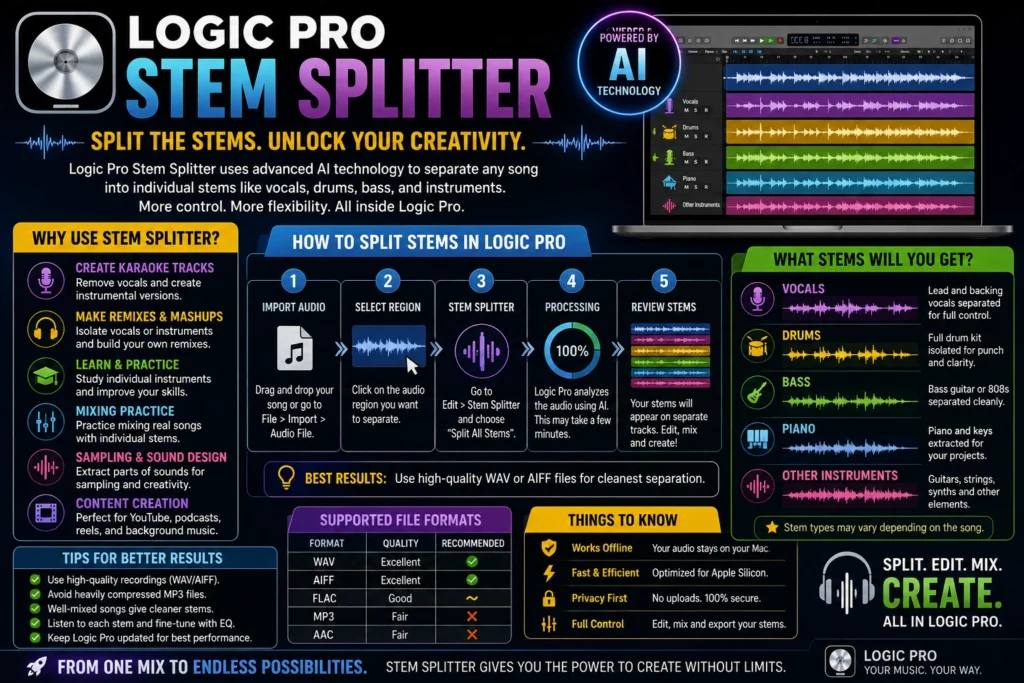
Once you’ve imported your audio into Logic Pro, using Stem Splitter takes only a few steps. The feature is designed to be beginner-friendly while offering enough flexibility for professional music production.
Step 1: Open Your Project
Launch Logic Pro and either create a new project or open an existing one.
If you’re starting from scratch, choose New Project and save it before importing any audio files.
Step 2: Import Your Audio File
Drag your song directly into the Tracks area or go to:
File → Import → Audio File
Logic Pro supports several audio formats, including:
- WAV
- AIFF
- MP3
- AAC
For the best separation quality, use WAV or AIFF files because they preserve more audio detail than compressed formats like MP3.
Step 3: Select the Audio Region
Click on the imported audio region so Logic Pro knows which file you want to analyze.
If your project contains multiple songs, make sure you’ve selected the correct track before continuing.
Step 4: Run Stem Splitter
Choose the Stem Splitter option from Logic Pro’s editing tools.
Logic Pro immediately begins analyzing the song using Apple’s machine-learning technology. During this process, the software identifies different musical elements such as vocals, drums, bass, and instruments.
Processing time depends on several factors:
- Length of the song
- Audio quality
- Number of instruments
- Your Mac’s processor
- Available memory
Apple Silicon Macs usually complete the process much faster than older systems.
Step 5: Review Your New Stems
After processing finishes, Logic Pro creates separate tracks for each detected stem.
Depending on the song, you may see tracks for:
- Lead Vocals
- Backing Vocals
- Drums
- Bass
- Piano
- Guitar
- Other Instruments
Each stem behaves like a normal audio track, meaning you can edit, mute, solo, duplicate, trim, or process it independently.
What Can You Do After Separating Stems?
The real power of Stem Splitter begins after the audio has been separated.
Create Instrumental Versions
Mute the vocal track to create a clean instrumental version of the song. This is perfect for karaoke, rehearsals, and live performances.
Build Professional Remixes
Instead of using the entire song, isolate the vocal stem and combine it with your own beats, synths, and instruments to create unique remixes.
Practice Mixing
Many beginner producers struggle to find high-quality multitracks for mixing practice.
Stem Splitter allows you to:
- Balance vocals
- EQ drums
- Compress bass
- Add effects
- Practice mastering techniques
This makes it an excellent educational tool.
Learn Individual Instruments
Musicians often use Stem Splitter to isolate one instrument at a time.
For example:
- Guitarists can focus on rhythm parts.
- Bass players can study bass lines.
- Drummers can hear every drum hit clearly.
- Singers can practice harmonies.
Create Social Media Content
Content creators frequently remove vocals to create background music for YouTube videos, podcasts, tutorials, and presentations.
Tips for Better Stem Separation
Although Logic Pro’s AI is impressive, your results depend heavily on the quality of the original recording.
Here are a few practical tips.
Use High-Quality Audio
Lossless formats such as WAV and AIFF provide more detail for the AI to analyze, resulting in cleaner stems.
Avoid Low-Bitrate MP3 Files
Highly compressed audio removes frequencies that AI relies on when separating instruments.
Choose Well-Mixed Songs
Professional recordings generally produce better results than live recordings or heavily distorted tracks.
Listen to Every Stem
After separation, solo each track and check for unwanted bleed between instruments. Small EQ adjustments can often improve clarity.
Keep Logic Pro Updated
Apple regularly improves Stem Splitter through Logic Pro updates, so using the latest version ensures the best performance and accuracy.
Common Problems and How to Fix Them
Even though Stem Splitter works well, you may occasionally run into issues.
| Problem | Possible Solution |
|---|---|
| Stem Splitter not available | Update Logic Pro to the latest version. |
| Slow processing | Close background apps and free up RAM. |
| Poor-quality stems | Use a higher-quality source file such as WAV. |
| Audio artifacts | Apply gentle EQ or noise reduction after separation. |
| Processing fails | Restart Logic Pro and try importing the file again. |
Most issues are related to the quality of the source audio rather than the software itself.
Pros and Cons of Logic Pro Stem Splitter
| Pros | Cons |
|---|---|
| Built directly into Logic Pro | Not every song separates perfectly |
| Fast AI processing | Minor audio artifacts may appear |
| Great for remixing and learning | Complex mixes are more challenging |
| No internet connection required | Requires a supported Logic Pro version |
| Easy for beginners | Results depend on source audio quality |
Is Logic Pro Stem Splitter Better Than Online AI Tools?
There are many online AI services that promise vocal removal or stem separation, but they often require you to upload your music to a remote server. Logic Pro offers several advantages by keeping the entire process inside your DAW.
| Feature | Logic Pro Stem Splitter | Online AI Tools |
|---|---|---|
| Works Offline | Yes | Usually No |
| Privacy | Audio stays on your Mac | Files are uploaded |
| Editing Workflow | Fully integrated | Export required |
| Additional Software | Not needed | Often required |
| Best for Professionals | Yes | Limited editing |
If you’re already using Logic Pro, Stem Splitter offers a smoother and more secure workflow than relying on third-party web tools.
FAQS
What is Logic Pro Stem Splitter?
Logic Pro Stem Splitter is an AI-powered feature that separates a mixed song into individual tracks such as vocals, drums, bass, and instruments.
Can Logic Pro remove vocals from a song?
Yes. Stem Splitter can isolate vocals into their own track, allowing you to mute, edit, or process them independently.
Does Stem Splitter work with MP3 files?
Yes, but WAV and AIFF files generally produce cleaner results because they contain more audio information.
Can I edit each stem separately?
Absolutely. Each generated stem becomes its own audio track inside Logic Pro, making it easy to apply plugins, adjust levels, or add effects.
Is Stem Splitter available in every version of Logic Pro?
No. Stem Splitter is available only in newer versions of Logic Pro that include Apple’s AI-powered audio separation technology.
Is Logic Pro Stem Splitter free?
Stem Splitter is included with compatible versions of Logic Pro, so there is no additional charge to use it.
Final Thoughts
Logic Pro Stem Splitter is one of the most valuable tools added to Logic Pro in recent years. It makes complex audio separation simple, allowing producers, musicians, DJs, and educators to isolate vocals and instruments without needing the original multitrack session.
While AI-powered separation isn’t flawless, the quality is impressive for most professionally produced songs. Whether you’re creating remixes, producing karaoke tracks, practicing mixing, or studying arrangements, Stem Splitter can dramatically speed up your workflow and unlock new creative possibilities.
As Apple continues improving Logic Pro, Stem Splitter is likely to become even more accurate and powerful, making it an essential feature for anyone serious about music production.
Related Logic Pro Guides
Expand your Logic Pro skills with these helpful guides:
- How to Mix and Master in Logic Pro X
- How to Add Plugins to Logic Pro X
- Logic Pro Plugins Not Showing
- How to Export Logic Pro as MP3
- Logic Pro Free Trial
- Logic Pro Running Slow
- Logic Pro vs GarageBand
- Logic Pro vs Cubase
- Logic Pro for iPad Review
- Best MacBook for Logic Pro X
These tutorials will help you troubleshoot common issues, improve your workflow, and get more from Logic Pro.
 Reliable Knowledge, Fresh Perspectives