

Logic Pro vs Cubase: Which DAW Is Better for Music Production in 2026?
When it comes to professional music production, Logic Pro vs Cubase are two of the most respected digital audio workstations (DAWs) available today. Both have been used to create hit songs, film scores, podcasts, and commercial recordings, but they offer different workflows and strengths.
If you’re planning to invest in a DAW, choosing the right one can save you time and help you stay productive for years. The best choice depends on the type of music you create, the computer you use, and the features that matter most to your workflow.
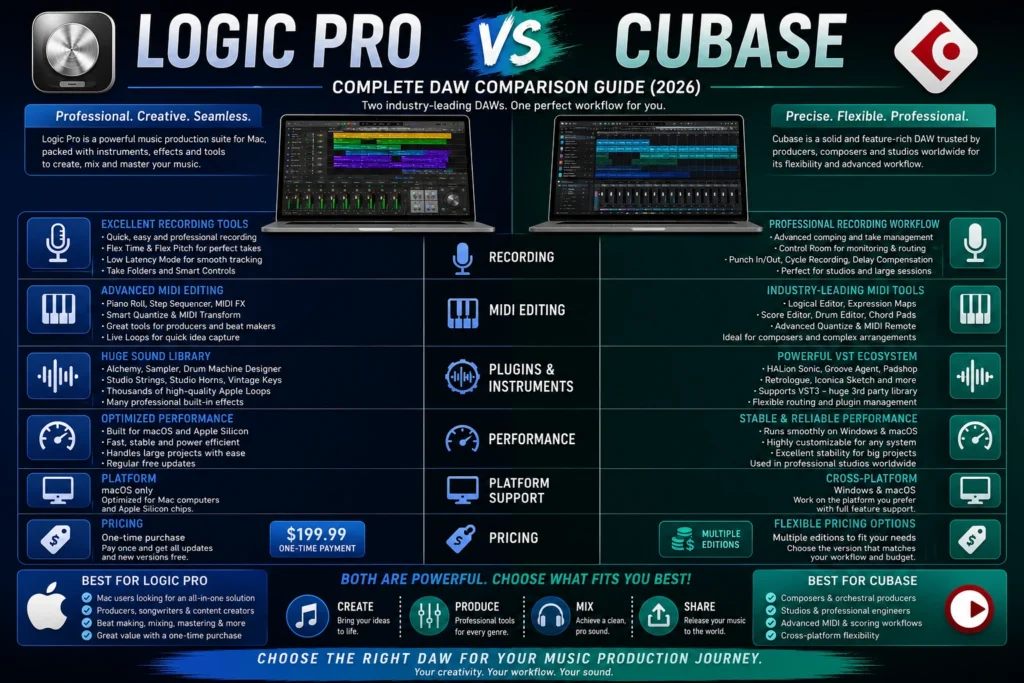
In this guide, we’ll compare Logic Pro and Cubase across recording, MIDI editing, plugins, performance, pricing, ease of use, and overall value.
Logic Pro vs Cubase: Quick Comparison
| Feature | Logic Pro | Cubase |
|---|---|---|
| Best For | Mac users, songwriters, producers | Professional studios, composers |
| Platform | macOS only | Windows & macOS |
| Pricing | One-time purchase | Multiple paid editions |
| Recording | Excellent | Excellent |
| MIDI Editing | Advanced | Industry-leading |
| Built-in Instruments | Extensive | Extensive |
| Plugin Support | Audio Units (AU) | VST3 |
| Dolby Atmos | Yes | Yes (supported editions) |
| Learning Curve | Moderate | Moderate to Advanced |

What Is Logic Pro?
Logic Pro is Apple’s professional music production software designed exclusively for macOS. It combines recording, editing, mixing, mastering, virtual instruments, and advanced MIDI tools into one application.
It’s widely used by musicians, producers, YouTubers, podcasters, and film composers because it offers powerful features at a competitive one-time price.

What Is Cubase?
Cubase, developed by Steinberg, is one of the oldest and most respected DAWs in the industry. It is available for both Windows and macOS and is especially popular among composers, producers, and audio professionals who need detailed MIDI editing and advanced recording capabilities.
Cubase also introduced the VST plugin standard, which has become one of the most widely used plugin formats in music production.
User Interface
Logic Pro features a clean and modern interface that feels intuitive, especially for Mac users. Menus are well organized, making it easier for beginners to learn while still offering powerful tools for professionals.

Cubase has a more technical interface with extensive customization options. While it may feel more complex at first, experienced users often appreciate the level of control it provides.
- Ease of Use: Logic Pro
- Customization: Cubase

Recording
Both DAWs are excellent for recording vocals, guitars, drums, and live instruments.
Logic Pro includes features such as:
- Take folders
- Flex Time
- Flex Pitch
- Low-latency mode
- Smart recording tools
Cubase offers:
- Advanced comping
- Professional punch recording
- Control Room monitoring
- Extensive routing options
- Professional studio workflow

Both applications provide professional-quality recording suitable for commercial projects.
MIDI Editing
MIDI editing is one of Cubase’s biggest strengths.
Cubase includes:
- Logical Editor
- Expression Maps
- MIDI Remote
- Drum Editor
- Score Editor
- Advanced Quantize
Logic Pro also provides excellent MIDI features, including:
- Step Sequencer
- Piano Roll
- MIDI FX
- Live Loops
- Smart Quantize
For composers and orchestral musicians working with complex MIDI arrangements, Cubase offers more advanced editing capabilities.
Virtual Instruments
Logic Pro includes an impressive collection of built-in instruments:
- Alchemy Synth
- Sampler
- Drum Machine Designer
- Studio Strings
- Studio Horns
- Vintage Keyboards
Cubase includes:
- HALion Sonic
- Groove Agent
- Padshop
- Retrologue
- Iconica Sketch
Both DAWs provide excellent sounds, but Logic Pro offers exceptional value considering its price.
Audio Effects
Both applications include professional-quality plugins.
Logic Pro offers:
- ChromaVerb
- Space Designer
- Vintage EQ
- Compressor
- Adaptive Limiter
- Tape Delay
Cubase includes:
- Frequency EQ
- REVelation
- SuperVision
- Multiband Compressor
- StudioEQ
Both are capable of producing professional mixes without relying on third-party plugins.
Plugin Support
Logic Pro supports Audio Unit (AU) plugins.
Cubase supports VST3, the industry-standard plugin format developed by Steinberg.
If you frequently use third-party plugins across multiple DAWs, Cubase’s VST support offers greater flexibility.
Performance
Logic Pro is highly optimized for Apple Silicon Macs, offering fast loading times and smooth performance even on large projects.
Cubase performs well on both Windows and macOS, making it a great option for producers who work across different operating systems.
- Mac Users: Logic Pro
- Cross-Platform Users: Cubase
Pricing
| Software | Pricing Model |
|---|---|
| Logic Pro | One-time purchase |
| Cubase | Multiple editions with different prices |
Logic Pro is often considered one of the best values in professional music production because a single purchase includes future updates for Mac users.
Cubase offers different editions, allowing users to choose a version that matches their needs and budget.
Pros and Cons
Logic Pro
Pros
- Excellent value
- Huge sound library
- Modern interface
- Optimized for Apple Silicon
- Strong recording and mixing tools
- Free updates with the Mac version
Cons
- macOS only
- Supports AU plugins only
Cubase
Pros
- Advanced MIDI editing
- Excellent scoring tools
- Cross-platform support
- Powerful recording workflow
- VST3 compatibility
Cons
- More expensive editions
- Steeper learning curve
- Interface can feel overwhelming for beginners
Who Should Choose Logic Pro?
Logic Pro is ideal if you:
- Use a Mac
- Want a one-time purchase
- Produce music professionally
- Need built-in instruments and effects
- Prefer an intuitive workflow
- Create podcasts or film music
Who Should Choose Cubase?
Cubase is a great choice if you:
- Use Windows or macOS
- Work with complex MIDI projects
- Compose orchestral music
- Need advanced scoring tools
- Use VST plugins extensively
- Work in professional studio environments
Final Verdict
Logic Pro and Cubase are both exceptional DAWs capable of producing professional-quality music.
If you’re a Mac user looking for outstanding value, a polished interface, and a powerful all-in-one production environment, Logic Pro is an excellent choice. Its one-time purchase model, extensive sound library, and seamless macOS integration make it one of the best investments for musicians and producers.
If you need cross-platform compatibility, industry-leading MIDI editing, or advanced composition tools, Cubase stands out as a strong alternative. It’s particularly well suited for composers, orchestrators, and producers working on detailed, large-scale projects.
Ultimately, the best DAW is the one that complements your workflow and inspires you to create more music.
FAQS
Is Logic Pro better than Cubase?
It depends on your needs. Logic Pro is a great choice for Mac users seeking excellent value and an intuitive workflow, while Cubase excels in advanced MIDI editing and cross-platform compatibility.
Can Cubase open Logic Pro projects?
No. Logic Pro and Cubase use different project formats. You can transfer audio stems or MIDI files between the two, but project files cannot be opened directly.
Which DAW is better for beginners?
Logic Pro is generally easier to learn because of its cleaner interface and streamlined workflow.
Which DAW is better for film scoring?
Cubase is often preferred for large orchestral and film scoring projects thanks to its advanced MIDI and notation features, although Logic Pro is also widely used by film composers.
Is Logic Pro worth buying over Cubase?
If you use a Mac and want professional music production software with a one-time purchase, Logic Pro offers outstanding long-term value. Cubase is a better option if you require advanced composition tools or need to work on both Windows and macOS.
 Reliable Knowledge, Fresh Perspectives