Logic Pro vs GarageBand, Complete Comparison for Beginners & Professionals (2026)
If you’re looking for music production software on a Mac, two names will quickly stand out: Logic Pro and GarageBand. Both are developed by Apple, both have a clean and beginner-friendly interface, and both can help you create professional-sounding music. However, they are designed for different types of users.

GarageBand is a free application that focuses on simplicity, while Logic Pro is a professional digital audio workstation (DAW) built for musicians, producers, composers, and audio engineers who need advanced tools.
So, which one should you choose?
In this guide, we’ll compare Logic Pro and GarageBand across features, pricing, performance, recording, plugins, editing, and overall value to help you make the right decision.
Logic Pro vs GarageBand at a Glance
| Feature | Logic Pro | GarageBand |
|---|---|---|
| Best For | Professional music production | Beginners & hobbyists |
| Price | One-time purchase | Free |
| Platform | macOS & iPadOS | macOS & iOS |
| Recording | Professional | Beginner-friendly |
| MIDI Editing | Advanced | Basic |
| Built-in Instruments | Extensive library | Good selection |
| Audio Effects | Professional-grade | Basic effects |
| Dolby Atmos | Yes | No |
| Third-Party Plugins | Yes (Audio Units) | Yes (Audio Units) |
| Learning Curve | Moderate | Easy |
It depends on your goals. GarageBand is perfect for getting started, while Logic Pro is designed for users who want more control and advanced production features.

What Is GarageBand?
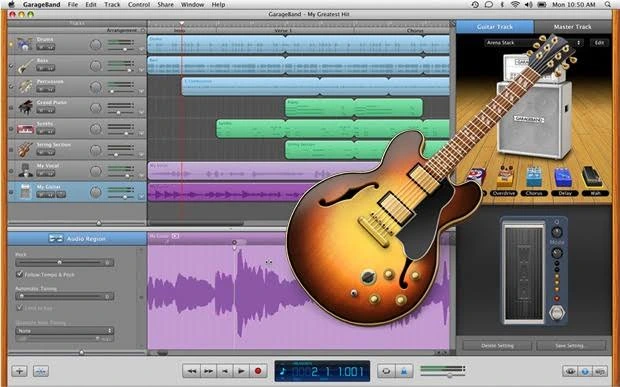
GarageBand is Apple’s free music production software for Mac, iPhone, and iPad. It includes everything you need to record vocals, create beats, play virtual instruments, and mix simple songs.
Its clean interface makes it one of the easiest DAWs for beginners. You can start recording within minutes, even if you’ve never used music software before.
For students, hobbyists, podcasters, and casual musicians, GarageBand is an excellent place to begin.
What Is Logic Pro?

Logic Pro is Apple’s professional music production software. It builds on everything GarageBand offers and adds advanced recording, editing, mixing, mastering, and MIDI tools.
Professional producers use Logic Pro for:
- Music production
- Film scoring
- Podcast editing
- Beat making
- Audio recording
- Mixing and mastering
- Dolby Atmos projects
- Large commercial sessions
Although it takes a little longer to learn, Logic Pro offers far more creative freedom.

User Interface
One reason many people move from GarageBand to Logic Pro is that the interface feels familiar.
Apple designed Logic Pro to make the transition as smooth as possible. If you’ve already learned GarageBand, you’ll recognize many of the menus, controls, and editing tools.
GarageBand focuses on simplicity, while Logic Pro gives you deeper control over almost every aspect of your project.
- GarageBand is easier for beginners.
- Logic Pro is better for advanced users.
Recording
Both applications allow you to record vocals and instruments using an audio interface.
However, Logic Pro offers more professional recording features, including:
- Advanced comping
- Take folders
- Flex Time
- Flex Pitch
- Punch recording
- Low-latency mode
- Advanced automation
GarageBand covers the basics well, but larger recording sessions are much easier to manage in Logic Pro.

Virtual Instruments
Both programs include high-quality software instruments, but Logic Pro offers a much larger collection.
Logic Pro includes:
- Alchemy Synth
- Drum Machine Designer
- Sampler
- Quick Sampler
- Studio Strings
- Studio Horns
- Vintage Keyboards
- Bass instruments
- Thousands of presets
GarageBand includes enough sounds for beginners, but professionals will appreciate the broader selection available in Logic Pro.
MIDI Editing
If you enjoy producing electronic music or programming instruments, MIDI editing is an important feature.
GarageBand provides simple MIDI editing tools that are easy to learn.
Logic Pro adds:
- MIDI Transform
- Advanced quantization
- MIDI FX
- Environment tools
- Articulation editing
- Step Sequencer
- Live Loops
These tools allow producers to build much more detailed arrangements.
Audio Effects
Logic Pro includes one of the best collections of built-in effects available in any DAW.
Some of its professional plugins include:
- Vintage EQ
- Multipressor
- Adaptive Limiter
- Space Designer Reverb
- ChromaVerb
- Channel EQ
- Compressor
- Tape Delay
- Amp Designer
GarageBand includes useful effects but offers fewer customization options.
Performance
Because both applications are developed by Apple, they run exceptionally well on modern Macs.
GarageBand is lighter and loads quickly, making it ideal for older computers or beginners working on smaller projects.
Logic Pro uses more system resources because of its professional feature set, but it performs extremely well on Apple Silicon Macs.
- Older Macs: GarageBand
- Modern Macs: Logic Pro
Third-Party Plugins
Both GarageBand and Logic Pro support Audio Unit (AU) plugins.
However, Logic Pro offers better plugin management, routing, and advanced controls.
If you plan to build a professional studio using third-party instruments and effects, Logic Pro is the better option.
Pricing
One of the biggest differences is price.
| Software | Cost |
|---|---|
| GarageBand | Free |
| Logic Pro | $199.99 (one-time purchase) |
GarageBand is included free with most Apple devices, while Logic Pro requires a single purchase and includes future updates for Mac users.
Pros and Cons
Logic Pro
Pros
- Professional recording tools
- Advanced MIDI editing
- Huge sound library
- Dolby Atmos support
- Excellent built-in plugins
- Great long-term value
Cons
- Paid software
- More features to learn
- Available only for Apple devices
GarageBand
Pros
- Completely free
- Easy to learn
- Clean interface
- Great for beginners
- Runs well on most Macs
Cons
- Limited advanced editing
- Smaller sound library
- Fewer mixing tools
- Not suitable for complex professional projects
Who Should Choose GarageBand?
GarageBand is a great choice if you:
- Are completely new to music production
- Record simple songs
- Create podcasts
- Produce music as a hobby
- Want free software
- Own an iPhone, iPad, or Mac
Who Should Choose Logic Pro?
Logic Pro is ideal if you:
- Produce music professionally
- Record multiple musicians
- Need advanced mixing tools
- Work with MIDI extensively
- Create film scores
- Produce commercial releases
- Want room to grow without switching DAWs later
Can You Upgrade from GarageBand to Logic Pro?
Yes. One of the best things about Apple’s music software is that Logic Pro can open GarageBand projects. This means you can start with GarageBand, learn the basics, and move to Logic Pro when you need more advanced features—without losing your existing work.
This smooth upgrade path makes GarageBand an excellent stepping stone into professional music production.
Final Verdict
Choosing between Logic Pro and GarageBand comes down to your experience level and goals.
If you’re just starting, GarageBand offers everything you need to learn the basics of recording and music production. It’s free, easy to use, and surprisingly capable.
However, if you’re serious about producing music, recording professionally, or building a long-term studio setup, Logic Pro is the better investment. Its powerful editing tools, professional plugins, advanced MIDI features, and one-time purchase model make it one of the best-value DAWs available for Mac users.
Rather than seeing them as competitors, think of GarageBand as the first step and Logic Pro as the natural upgrade when you’re ready to take your music to the next level.
FAQS
Is Logic Pro better than GarageBand?
Yes, Logic Pro offers significantly more advanced features for recording, editing, mixing, mastering, and MIDI production. GarageBand is better suited for beginners.
Is GarageBand free?
Yes. GarageBand is completely free on compatible Apple devices.
Can GarageBand projects be opened in Logic Pro?
Yes. Logic Pro can open GarageBand projects, making it easy to continue working on your music as your skills grow.
Which is easier to learn?
GarageBand has a simpler interface and is easier for beginners. Logic Pro has a steeper learning curve but offers much greater flexibility.
Is Logic Pro worth buying if I already use GarageBand?
If you’ve outgrown GarageBand and need more professional recording, mixing, virtual instruments, and editing tools, Logic Pro is well worth the investment.
 Reliable Knowledge, Fresh Perspectives